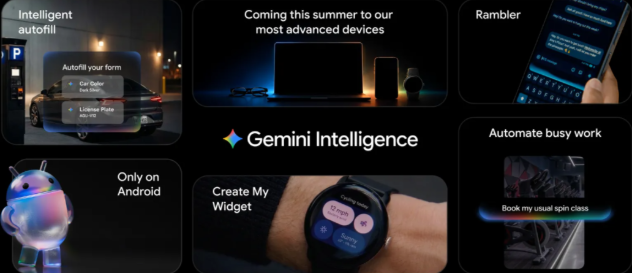
Google is introducing Gemini Intelligence on Android, which brings the best of Gemini to Android’s most advanced devices. It integrates premium hardware and innovative software to help you stay a step ahead by working proactively to get things done throughout your day — all while keeping your data private, and keeping you in control.
Gemini Intelligence features will roll out in waves starting with the latest Samsung Galaxy and Google Pixel phones this summer, and will become available across Android devices including the watch, car, glasses and laptops later this year.
Gemini Intelligence helps you automate tedious tasks so you can focus on what matters. Google says it has spent months fine-tuning multi-step automation capabilities on the Galaxy S26 and Pixel 10 on popular food and rideshare apps to ensure every interaction feels seamless.
Soon, devices with Gemini Intelligence will do all that and more. Gemini will navigate tasks for you — whether it’s snagging a front-row bike for your spin class or finding your class syllabus in Gmail then putting the books you need in your cart. Gemini handles the logistics while you stay in the moment.
App automation is even more powerful when you add screen or image context. Instead of manually switching between apps and copying data, Gemini can turn visual context into instant action. Imagine you have a long grocery list on your notes app. Just long press the power button over the list and ask Gemini to build a shopping cart with all of the items for delivery.
Starting in late June, Android devices will be getting a smarter browsing assistant for the web: Gemini in Chrome can help you research, summarize and compare content across the web. Chrome auto browse can take care of more mundane tasks on your behalf, whether it’s appointment booking or reserving a parking spot.
Autofill with Google is evolving from a basic convenience into something more intelligent and intuitive. By using Gemini’s Personal Intelligence, Android will automatically fill in even more of those tiny text fields across your apps, including Chrome.
Google is tackling a universal hassle: filling out complex forms on a mobile screen. Because now, your device can use relevant information from your connected apps to fill forms out for you.
Connecting Gemini to Autofill with Google is strictly opt-in, meaning you choose if and when you want to connect to Gemini – and you can always turn this connection on or off in your settings.
With Gemini Intelligence, Google is taking the first step in generative UI with a hallmark of Android: widgets.
With Create My Widget, there are even more ways to make your device truly yours. You can build entirely custom widgets just by describing what you want using natural language. For example, if you’re a meal prepper, just ask Create My Widget to “Suggest three high-protein meal prep recipes every week,” and watch as it builds a custom dashboard you can add and resize right on your home screen. Or if you’re a cyclist who only cares about wind speed and rain, you can create a weather widget that surfaces those exact stats.